
You've heard of body doubling - working near someone else to stay focused and on task. The idea is simple: the presence of another person, even a silent one, helps your brain stay engaged instead of drifting.
The only problem? Most body doubling tools require you to turn on your camera, book a session with a stranger at a fixed time, and essentially perform being productive. For a lot of people, that's more stressful than working alone.
FocusLive takes a different approach. It gives you all the psychological benefits of body doubling - the ambient presence, the sense of shared purpose - without a camera, without scheduling, and without showing your face to anyone. Here's how it works.
What is body doubling?
Body doubling is the practice of working in the presence of another person to improve focus and follow-through. You're not collaborating. You're not talking. You're simply near someone while you both get things done.
If you want the broader explanation of why that works, read our guide to virtual body doubling.
The effect is well-documented, particularly in the ADHD community. When the brain knows someone else is present, it becomes harder to justify procrastinating. The low-level social awareness acts like an anchor, pulling your attention back to the task at hand.
In a physical world, this is why coffee shops, libraries, and coworking spaces work. People go there not just for the wifi - they go because being around other focused humans is contagious. Virtual body doubling replicates this digitally. Instead of going somewhere, you open a tab.
If you're comparing different low-friction options, we also broke down the best anonymous coworking spaces online.
Why most body doubling tools make it harder than it should be
The most popular body doubling tools - platforms like Focusmate, structured study-with-me calls, or accountability Zoom sessions - all share a common assumption: that you're willing to be seen. That assumption rules out a lot of people.
Camera anxiety is real. On bad days, bad lighting, or just days when you'd rather not think about how you look, turning on a camera introduces friction that can make you avoid the tool entirely. And a productivity tool you avoid isn't a productivity tool.
Scheduling is its own cognitive load. Booking a 50-minute session for a specific time slot means you need to be focused enough, ready enough, and free enough - all at the same time. For people with ADHD or unpredictable energy levels, that coordination overhead is often the biggest barrier.
Social pressure sneaks in too. Even on silent video calls, there's an awareness of being watched. You feel the urge to look busy, to not check your phone, to end the session politely. It becomes a performance. And performance is exhausting.
The result: the people who most need body doubling are the least likely to stick with tools that pile on extra friction.
How FocusLive works: no camera, no sign-up required
FocusLive was built around a simple premise: body doubling should be as low-friction as opening a new browser tab.
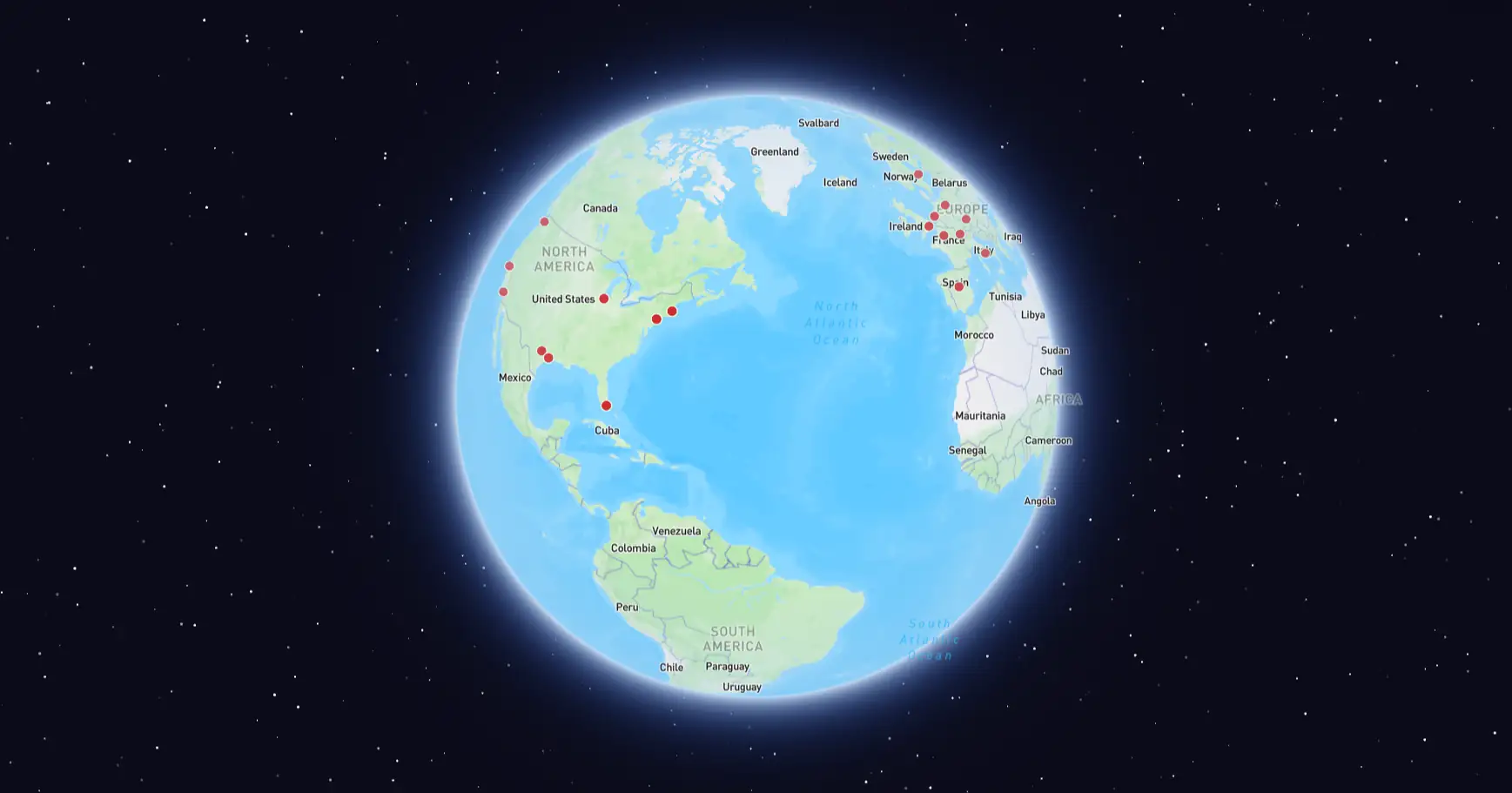
When you join FocusLive, you don't see faces. You see a 3D globe, and on that globe, you see dots - one for every person currently working. You are one of those dots. There's no video feed, no profile photo, no username unless you want one. Just the quiet knowledge that right now, at this moment, other people around the world are sitting down and doing their work too.
No camera, ever
FocusLive never asks for camera access. Your presence on the globe is represented as a single point of light - anonymous by design. There's nothing to perform, nothing to tidy up for, no reason to feel self-conscious. You can work in your pajamas, with messy hair, in poor lighting, with a pile of laundry behind you. Nobody knows, and nobody cares.
Two-click onboarding
FocusLive has a Guest Mode that gets you onto the globe in seconds. Click "Join as guest," and you're assigned a temporary ID - something like Guest-4821. No email address. No password. No profile to set up. You're live and visible on the globe before you've had time to second-guess yourself.
For people who abandon apps at the sign-up screen, this matters enormously.
Your location stays private
FocusLive uses your approximate location to place your dot on the globe, but it deliberately jitters those coordinates by 2-3 kilometres. Your exact location is never exposed - not to other users, not to the platform. You appear somewhere in your city, not on your street.
An ambient atmosphere built in
FocusLive features an integrated, customizable music player designed specifically for deep work. You can tailor your auditory environment by selecting from a curated library of lo-fi beats, ambient cafe hums, or nature sounds. This persistent audio backdrop fills the silence without distraction, mimicking the productive energy of your favorite workspace.
Who benefits most from camera-free body doubling
People with ADHD who thrive with accountability but find video calls overstimulating or exhausting. The ambient presence of the globe provides just enough structure without sensory overload.
Remote workers who feel isolated working from home but have already had more Zoom time than they ever wanted. FocusLive gives you the "not alone" feeling without adding another video call to your day.
Students who want the library atmosphere - focused people around them, quiet and purposeful - without having to leave the house or book a room.
Freelancers and solopreneurs who work odd hours and can't guarantee they'll be free at 2pm on Thursday. Because FocusLive has no scheduling, you can drop in at 7am, 11pm, or any point in between and find people already working.
Anyone with social anxiety who craves community but finds direct interaction draining. FocusLive gives you connection without conversation - you're present with others, but there's no obligation to engage.
How to get started in under 60 seconds
Navigate to focuslive.app/realtime and click "Join as guest" - no account required. You appear on the globe instantly. No camera permission request. No scheduling interface. You open the tab, and you're working alongside everyone else on the globe.
When you're done, close the tab. Your session ends automatically. No check-out, no follow-up email, no rating to leave.
The best productivity tool is the one you'll actually open
Body doubling works. The research is clear, the anecdotal evidence from ADHD communities is overwhelming, and the feeling of sitting in a library - surrounded by other people quietly getting things done - is something most people have experienced firsthand.
The barrier has never been the concept. The barrier has been the camera, the scheduling, the friction, and the social pressure that most tools layer on top of a fundamentally simple idea.
FocusLive strips all of that away. It's a tab you open when you need to work. The globe is there. The people are there. And now, so are you.
Try it now
Open FocusLive and join realtime focus globe
No camera, no account setup, no scheduling required. Just open the tab and start working alongside others.
Try FocusLive free - no camera, no sign-up